*DIAGNOSIS AND CHECKOUT PROCEDURE FOR SEAT WEIGHT SENSORS
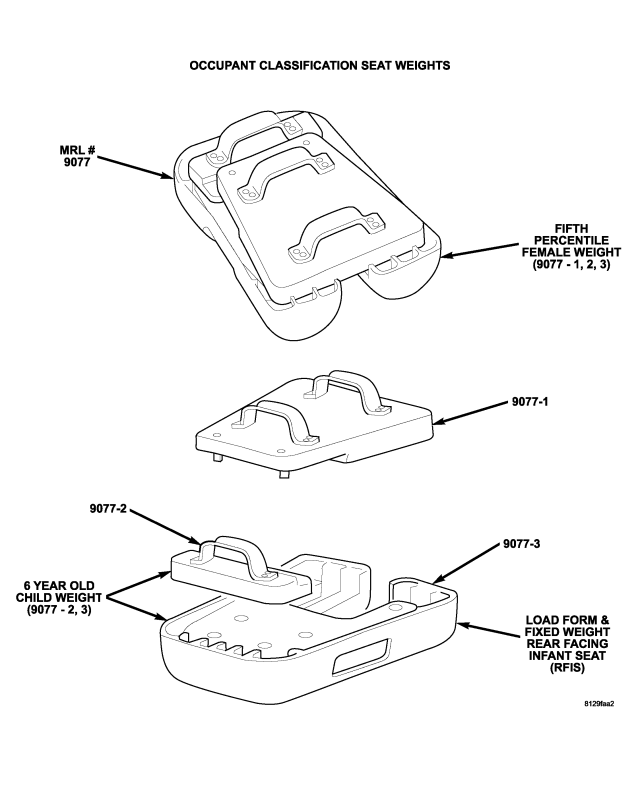
| OCS SEAT WEIGHTS MRL #9077 |
1.VERIFY COMPLAINT
Is any sensor's voltage reading out of the acceptable range in any position?
Yes
- Go To 2
No
- Perform test B1BA7-Occupant Classification System Verification Required. If the test passes, the seat weight sensing system is working properly. Return to the procedure that directed you to this procedure.
2.CHECKING FOR BENT FLOOR PAN
Is any sensor's voltage reading out of the acceptable range in any position?
Yes
- Go To 3
No
- Perform test B1BA7-Occupant Classification System Verification Required. Return to the procedure that directed you to this procedure.
- If the test passes, the seat weight sensing system is working properly.
- Return to the procedure that directed you to this procedure.
3.CHECKING SEAT TO RISER STRESS
Is any sensor's voltage reading out of the acceptable range?
Yes
- Go To 4
No
- Visually inspect for damaged or bent risers and crossmembers. Also, verify that the riser holes line up with the seat mounts in the crossmembers.
- If riser damage is apparent, replace the risers in accordance with the Service Information. Then, reinstall the Seat Weight Sensors, and Go To 6.
NOTE: Failure to follow the test instructions or aborting the test will cause faults to set when performing the Occupant Classification Module System Verification Test. To prevent faults due to process errors: verify that all tests steps that led you here were performed as directed; verify that the ignition is in run; Wait 30 seconds after changing the seat weight before proceeding to allow the system to stabilize; only press scan tool buttons when directed to do so; and perform the Occupant Classification Module System Verification Test to completion.
- If crossmember or floorpan damage is present, repair or replace the components as necessary in accordance with the Service Information. Reinstall the seat in the vehicle in accordance with the Service Information. Turn the ignition on. With the scan tool in OCM, select More Options, select System Tests, and select Occupant Classification Module System Verification Test. Run the test by following the directions displayed on the scan tool. When the test is complete, Go To 1.
4.TEST SEAT FRAME
Is any sensor's voltage reading out of the acceptable range?
Yes
- Go To 5
No
- Visually inspect for damaged or bent risers, a damaged or bent seat and seat structure, and damaged or bent seat tracks. Also, verify that the holes in the center of the sensors line up with the seat track holes and that the seat track position locating tabs are locked in the same parallel slots. If riser damage is apparent, replace the risers in accordance with the Service Information. Then, reinstall the Seat Weight Sensors, and Go To 6.
- If seat or seat track damage is present, replace the components as necessary in accordance with the Service Information. Then, Go To 7.
5.TEST SENSOR
Is any sensor's voltage reading out of the acceptable range?
Yes
- Replace any Seat Weight Sensors that have an unacceptable voltage reading in accordance with the Service Information. Then, Go To 6.
No
- Replace the risers in accordance with the Service Information. Then, reinstall the Seat Weight Sensors, and Go To 6.
6.CHECKING FOR LOOSE SEAT WEIGHT SENSOR
Is any sensor's voltage reading out of the acceptable range?
Yes
- Loosen the mounting screws of all Seat Weight Sensors with an unacceptable voltage reading, and repeat Steps 5 and 6.
No
- Go To 7
7.TEST SEAT TRACKS
Is any sensor's voltage reading out of the acceptable range?
Yes
- Replace the seat track in accordance with the Service Information. Verify that no binding exists between the seat and risers. Then, repeat Steps 6 and 7.
No
NOTE: Failure to follow the test instructions or aborting the test will cause faults to set when performing the Occupant Classification Module System Verification Test. To prevent faults due to process errors: verify that all tests steps that led you here were performed as directed; verify that the ignition is in run; Wait 30 seconds after changing the seat weight before proceeding to allow the system to stabilize; only press scan tool buttons when directed to do so; and perform the Occupant Classification Module System Verification Test to completion.
- Reinstall the seat in the vehicle in accordance with the Service Information. Turn the ignition on. With the scan tool in OCM, select More Options, select System Tests, and select Occupant Classification Module System Verification Test. Run the test by following the instructions displayed by the scan tool. When the test is complete, Go To 1.